Featured
San Andreas / Autos / GTA V Autos
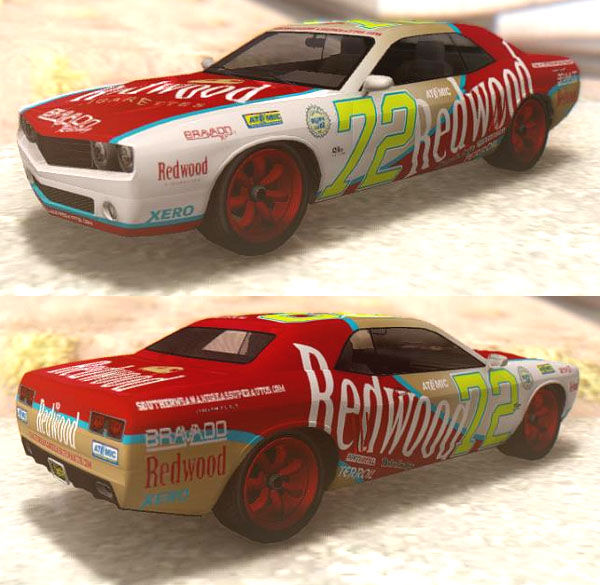
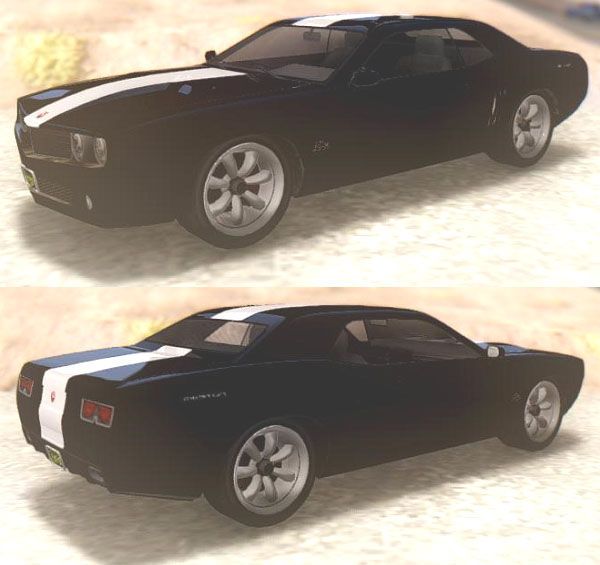
GTA V Bravado Gauntlet Redwood
- Automan, DK22Pac | hochgeladen von Automan
- 06/09/2015
- 18565 Downloads
Bewertungen:
Bitte melde dich zuerst an.
Favoriten:
Videos


Du musst angemeldet sein, um Videos zu diesem Mod hinzuzufügen.
Beschreibung
-Nextgen PC/XB1/PS4.
-Credits: ytdydryddyft2txddffcol converter & IVF211 by DK22Pak.
-Replace Walton. (Vehicles with paintjob can not be added).
-Reflections in my style, no GTA-SA.
-1 paintjob "Redwood".
-Personal editable plate:
All GTA-V plate, with two bumper font; alpha platea for remove plate.
-Damaged parts: All for this model.
-Flat shadow.
-All data strings.
-IVF211+ASI12 version.
-SA-Mobile version; without environment reflection.
-Tested in ENB30+CLEO43.
-No SA-MP/MTA testing.
-Open source; files unlocked.
-Only credits required for use it.
-Credits: ytdydryddyft2txddffcol converter & IVF211 by DK22Pak.
-Replace Walton. (Vehicles with paintjob can not be added).
-Reflections in my style, no GTA-SA.
-1 paintjob "Redwood".
-Personal editable plate:
All GTA-V plate, with two bumper font; alpha platea for remove plate.
-Damaged parts: All for this model.
-Flat shadow.
-All data strings.
-IVF211+ASI12 version.
-SA-Mobile version; without environment reflection.
-Tested in ENB30+CLEO43.
-No SA-MP/MTA testing.
-Open source; files unlocked.
-Only credits required for use it.
Kommentare
Es wurden bisher 56 Kommentare gepostet.






02/10/2020 09:24


Zitieren | Antworten
Quote: LeonStickManagesIt works on Zmodeler, thanks!Quote: LeonStickManagesNever mind, tks.Quote: AutomanQuote: LeonStickManagesHow to move? Can you post the picture step-by-step?Quote: AutomanQuote: LeonStickManages
How do you convert vehicle has a neat UV mapped?
Mine converted should like this! (sorry for bad english)
https://i.imgur.com/7jn7kO5.png
You have to move the UV mapping from channel 2 to channel 1. I use ZModeler2, I don't know how to do it with Blender (or 3dsmax).
This is the method for ZM2:
https://i.postimg.cc/rsz3GvsB/UV2toUV1.gif
that's all I can say, like I said, I don't have that program...
Zitieren | Antworten

02/10/2020 00:37
Zitieren | Antworten
It works on Zmodeler, thanks!Quote: LeonStickManagesNever mind, tks.Quote: AutomanQuote: LeonStickManagesHow to move? Can you post the picture step-by-step?Quote: AutomanQuote: LeonStickManages
How do you convert vehicle has a neat UV mapped?
Mine converted should like this! (sorry for bad english)
https://i.imgur.com/7jn7kO5.png
You have to move the UV mapping from channel 2 to channel 1. I use ZModeler2, I don't know how to do it with Blender (or 3dsmax).
This is the method for ZM2:
https://i.postimg.cc/rsz3GvsB/UV2toUV1.gif
that's all I can say, like I said, I don't have that program...
Zitieren | Antworten
02/09/2020 13:30
Zitieren | Antworten
Never mind, tks.Quote: AutomanQuote: LeonStickManagesHow to move? Can you post the picture step-by-step?Quote: AutomanQuote: LeonStickManages
How do you convert vehicle has a neat UV mapped?
Mine converted should like this! (sorry for bad english)
https://i.imgur.com/7jn7kO5.png
You have to move the UV mapping from channel 2 to channel 1. I use ZModeler2, I don't know how to do it with Blender (or 3dsmax).
This is the method for ZM2:
https://i.postimg.cc/rsz3GvsB/UV2toUV1.gif
that's all I can say, like I said, I don't have that program...
Zitieren | Antworten
02/09/2020 13:06
that's all I can say, like I said, I don't have that program...
Zitieren | Antworten
Quote: LeonStickManagesHow to move? Can you post the picture step-by-step?Quote: AutomanQuote: LeonStickManages
How do you convert vehicle has a neat UV mapped?
Mine converted should like this! (sorry for bad english)
https://i.imgur.com/7jn7kO5.png
You have to move the UV mapping from channel 2 to channel 1. I use ZModeler2, I don't know how to do it with Blender (or 3dsmax).
This is the method for ZM2:
https://i.postimg.cc/rsz3GvsB/UV2toUV1.gif
that's all I can say, like I said, I don't have that program...
Zitieren | Antworten
02/09/2020 12:13
Zitieren | Antworten
How to move? Can you post the picture step-by-step?Quote: AutomanQuote: LeonStickManages
How do you convert vehicle has a neat UV mapped?
Mine converted should like this! (sorry for bad english)
https://i.imgur.com/7jn7kO5.png
You have to move the UV mapping from channel 2 to channel 1. I use ZModeler2, I don't know how to do it with Blender (or 3dsmax).
This is the method for ZM2:
https://i.postimg.cc/rsz3GvsB/UV2toUV1.gif
Zitieren | Antworten
02/09/2020 09:17
You have to move the UV mapping from channel 2 to channel 1. I use ZModeler2, I don't know how to do it with Blender (or 3dsmax).
This is the method for ZM2:
https://i.postimg.cc/rsz3GvsB/UV2toUV1.gif
Zitieren | Antworten
Quote: LeonStickManages
How do you convert vehicle has a neat UV mapped?
Mine converted should like this! (sorry for bad english)
https://i.imgur.com/7jn7kO5.png
You have to move the UV mapping from channel 2 to channel 1. I use ZModeler2, I don't know how to do it with Blender (or 3dsmax).
This is the method for ZM2:
https://i.postimg.cc/rsz3GvsB/UV2toUV1.gif
Zitieren | Antworten


10/05/2015 07:59
After Paintjob, you must change the two colors to white. If the model has Transfender a single color, you need a mod like Pimp My Car by my friend ZAZ.
Zitieren | Antworten
Quote: TuCoT
Great conversion, one of my favourites. Actually you can replace this with Willard. But how do we remove strip on this car because with Redwood paintjob it looks weird.
After Paintjob, you must change the two colors to white. If the model has Transfender a single color, you need a mod like Pimp My Car by my friend ZAZ.
Zitieren | Antworten